

Công tắc cảm ứng tiệm cận là những anh hùng vô danh của tự động hóa. Nếu bạn đã từng tự hỏi làm thế nào máy móc “biết” khi có thứ gì đó ở gần mà không cần chạm vào nó, hoặc làm thế nào các nhà máy tự động hóa các tác vụ với độ chính xác chính xác, đó là kết quả của cảm biến tiệm cận cảm ứng hoạt động đằng sau hậu trường.
Trong hướng dẫn này, tôi sẽ hướng dẫn bạn mọi thứ bạn cần biết về các công tắc tiệm cận quy nạp-từ cách chúng hoạt động đến việc chọn một công tắc hoàn hảo cho dự án của bạn.
1. Inductive Proximity Switch là gì?
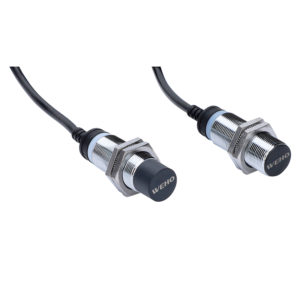
Công tắc tiệm cận cảm ứng là cảm biến không tiếp xúc phát hiện sự hiện diện của các vật kim loại. Không giống như các công tắc cơ học, nó không yêu cầu tiếp xúc vật lý, các thiết bị thông minh này sử dụng trường điện từ để cảm nhận sự hiện diện của các mục tiêu kim loại-khiến chúng trở nên lý tưởng cho các môi trường khắc nghiệt nơi bụi, mỡ hoặc rung sẽ phá hủy các thành phần thông thường.
Tại sao chúng lại đặc biệt như vậy?
Chi phí thấp: hey're bảo trì miễn phí (không có bộ phận chuyển động!).
Độ bền:Chúng hoạt động ở nhiệt độ khắc nghiệt và điều kiện bẩn thỉu.
Phản ứng tốc độ cao: Hoàn hảo cho tự động hóa tốc độ cao (nghĩ rằng dây chuyền lắp ráp hoặc máy đóng gói).
Mẹo chuyên nghiệp:. Lần tới khi bạn nhìn thấy một máy bán hàng tự động phân phát đồ ăn nhẹ hoặc gói phân loại băng chuyền, hãy nhớ rằng phép thuật đằng sau nó có thể chỉ là một công tắc tiệm cận cảm ứng!
2. Công tắc cảm ứng tiệm cận hoạt động như thế nào?
Chúng ta hãy dành một chút thời gian để hiểu nguyên tắc làm việc và cấu trúc của cảm biến tiệm cận cảm ứng. Tại cốt lõi của nó, một công tắc tiệm cận cảm ứng có ba phần chính:
- Oscillators: Tạo ra một trường điện từ tần số cao.
- Một cuộn dây: Phóng xạ trường ra ngoài.
- Mạch kích hoạt: Phát hiện những thay đổi trong trường gây ra bởi kim loại gần đó.
Vì vậy, đây là cách làm việc:
Khi một vật kim loại đi vào phạm vi của cảm biến, nó sẽ phá vỡ trường điện từ. Công tắc nhận thấy sự xáo trộn này và gửi tín hiệu (như lật công tắc đèn). Không cần tiếp xúc vật lý-sạch sẽ, nhanh chóng và đáng tin cậy.
Ví dụ trong thế giới thực: Tôi đã từng đến thăm một nhà máy nơi các công tắc này được sử dụng để phát hiện nắp kim loại trên chai. Nếu thiếu nắp, công tắc sẽ kích hoạt báo động. Thật tuyệt, phải không?
3. Làm thế nào để kiểm tra cảm ứng gần Switch
Kiểm tra công tắc tiệm cận cảm ứng rất đơn giản, nhưng bạn cần cách tiếp cận phù hợp để đảm bảo độ chính xác. Dưới đây là danh sách kiểm tra nhanh:
Phương pháp 1: Kiểm tra bằng mắt
Trước tiên hãy kiểm tra cảm biến xem có vết nứt, bụi bẩn hoặc hư hỏng không, sau đó làm theo các bước dưới đây để kiểm tra công tắc tiệm cận cảm ứng:
Bật công tắc lên.
Đặt một vật kim loại gần mặt cảm biến
Quan sát nếu đèn LED sáng lên
Remove the object and check if the LED turns off
Phương pháp 2: Kiểm tra vạn năng
To check for proper electrical output:
Set the multimeter to measure voltage (DC or AC, depending on the switch type).
Connect the probes to the sensor’s output terminals.
Introduce a metal object near the sensor.
Observe the multimeter reading—it should change when the object is detected.
Phương pháp 3: Kiểm tra chức năng
Mount the switch on a test rig.
Bring a metal object close. Does the machine respond? If not, swap the switch.
4. Các loại công tắc tiệm cận cảm ứng
Not all inductive sensors are created equal. Here’s a key type:
Theo loại đầu ra
NPN (Sinking): Common in Europe. Outputs connect to ground when activated.
PNP (Sourcing): Popular in the US. Outputs supply positive voltage.
Analog: Provides variable output based on distance (great for precision).
Bằng phạm vi cảm biến
Standard: 2mm–40mm (ideal for most industrial uses).
Extended Range: Up to 60mm (for bulky machinery).
Theo loại tín hiệu
Digital Output: Provides a simple ON/OFF signal.
Analog Output: Gives a variable signal based on the distance of the metal object.
Bằng vật liệu nhà ở
Nickel-plated brass: Affordable and durable.
Stainless steel: For corrosive or food-safe environments.
5.Ứng dụng chuyển mạch cảm ứng gần
Because of their reliability, durability, and precision, these sensors are used across multiple industries. Here are some real-world applications:
1. Sản xuất & Tự động hóa
Detecting metal components in an assembly line
Ensuring correct positioning in CNC machines
Preventing machine collisions in robotic arms
2. Công nghiệp ô tô
Sensor switch can ensure car door functionality
Inductive Proximity Switch detects the opening and closing of car bonnet
3. Bao bì & Logistics
Inductive proximity sensor helps count bottles on conveyor belt
Counting metal items in automated sorting systems
4. Chế biến thực phẩm
Monitoring metal contamination in grain.
Inductive Proximity Sensor Sorting fruits and vegetables.
5. An toàn & Bảo mật
Intrusion detection in access control systems
Detection of metal objects in baggage screening
6. Làm thế nào để cài đặt Inductive Proximity Switch
Installing an inductive proximity sensor is straightforward, but correct placement is key. Here’s how to do it:
1. Chọn đúng địa điểm
Place it near the moving metal part ensure the switch is within the detection range of the target object..
Avoid other electromagnetic sources that may interfere with detection(e.g., motors, transformers).
2. Gắn kết an toàn
Use screws or brackets to fix the inductive proximity sensor in place.
For flush mounts, drill a hole to the exact diameter.Ensure the inductive proximity sensor doesn’t move or vibrate.
3. Kết nối dây điện (Connect the Wiring)
DC Inductive Proximity Sensor: Red (+), Black (-), Blue (output)
AC Inductive Proximity Sensor: Brown (L), Blue (N), Black (output)
4. Kiểm tra chuyển đổi
Bring a metal object near. Does the machine respond?
Adjust the sensing distance if needed.
7. Các yếu tố cần xem xét khi chọn một công tắc tiệm cận cảm ứng
Picking the right inductive proximity switch isn’t just about the specs—it’s about what works for your application. Here’s what to consider:
- Khoảng cách phát hiện: How far away can it sense metal?
- Sensor Size: The size can be installed in the specified area.
- IP rating: Waterproof? Dustproof?
- Environmental Conditions:: Will it survive a freezer or a furnace?
- Điện áp cung cấp: Match your machine’s power supply (24V DC is common).
- Output Type: NPN, PNP, or analog?
- Mounting Style: Cylindrical, rectangular, or something else?
8.FAQs
Q: Can an inductive proximity switch detect non-metal objects?
A: No, these sensors only detect metal. If you need a sensor for plastic, wood, or liquids, consider capacitive proximity sensors instead.
Q: What is a disadvantage of an inductive proximity switch?
A: One disadvantage is that inductive proximity switches can only detect metal objects. They don’t work well with non-metal materials. Also, their sensing distance can be affected by the type of metal and environmental factors like temperature.
Q: What is the difference between capacitive and inductive proximity switches?
A: This is the difference between capacitive and inductive proximity switches. You can choose the appropriate sensor switch according to your actual situation and needs.
| Tính năng | Inductive Proximity Switch | Capacitive Proximity Switch |
| Detection Material | Metal objects | Metal and non-metal objects (plastics, liquids, etc.) |
| Detection Method | Electromagnetic induction | Capacitance change detection |
| Detection Range | Typically shorter range (1mm – 50mm) | Typically longer range (1mm – 100mm) |
| Cost | Có thể chi trả | Expensive |
Q:
9.Bản tóm tắt
Inductive proximity switches are essential components in industrial automation, industrial manufacturing, and safety applications. They provide accurate, non-contact detection of metal objects while improving overall work efficiency.
From testing and installation to selecting the right type, this blog covers everything you need to know. Whether you’re streamlining an assembly line or automating an industrial process, the right inductive proximity switch will make all the difference.
Thanks for joining me on this journey! Got a story or tip to share? Drop it in the comments—I’d love to hear from you